iTech-Edu-Radar

A blog about "Technology, networking and educational knowledge"

Showing posts with label ATM CARD. Show all posts

Oct 5, 2017

How to Make payment using the Google Tez app : See all Guiding Videos of Tez app made for India First.


What is Google Tez :
In September, Google launched its digital app, Tez, which works on the Unified Payment Interface. Making payments to third parties and receiving money can be done with a few taps on your mobile phone without divulging your account details or mobile number. Here is how you can use it.


Get the app first : 


Tez can be downloaded from the Apple iOS or Google Play store.
Add registered mobile number: For the app to work, the mobile number that should be registered should be the same as the number registered with your bank account.

(Introducing Tez – A new payments app by Google)

Create a 4 Digit Google PIN: 
A 4-digit Google PIN has to be set up for the app to work.
Add bank account: Choose your bank from the list. A secure message will then be sent from the registered mobile number and your bank account details will be captured. Next, enter the last 6 digits of your debit card number and its expiry date. Lastly, enter the OTP sent to you by the bank.


(Introducing Tez Created by Google, made for India first)


(Tez Quick tips to get started)

Make payment :
To make a payment, enter the name of the person you want to send money to, the amount, and a brief description of the transaction. Enter the MPIN to authorise the payment.


(Tez Add your bank account to Tez)

Cash mode :
The person to whom the payment is to be made through cash mode should have the Tez app as well. They also need to be in your vicinity and have to activate 'Receive' mode on their app. The payee need not be a saved contact on your phone. You just need to enter the amount to be transferred and the reason for transfer.


(Tez Pay people nearby with Cash Mode)


(Tez Send and receive money across India)


(Tez Installing From a Referral Link)


(Tez Refer a Friend for Rewards)

Things to remember :
  • Know which of your contacts have installed Tez and allow the app to access your contact list.
  • The app does not create an online wallet that you can top up for payments. Payments and receipts are made directly through your bank account.


Images and Video Courtesy : Google India Tez
Thank you...

Sep 27, 2017

Which is The Best Digital Payment App  : Tez Vs BHIM Vs Phone Pe Vs Paytm

  Tez is powered by the Indian government supported Unified Payments Interface (UPI). The “cash” mode feature in the Tez app lets users send and receive payment to the nearby users with Tez installed on their smartphone. There is no need for bank account details or phone number. This technology is Google’s proprietary and uses Audio QR (AQR) ultrasound technique that helps in pairing the phones. For Google Tez, the competitor is the cash currency. And the objective of this app is to encourage digital payment and make it simple and secure.


 Newly added Google Tez, Paytm, PhonePe, and BHIM application.,all of them have some special features, all these apps are made for easy transactions using your smartphone.


The new digital payment app developed by Google called “Tez” was launched on 18th September. The app has lot of new features which makes it stand out from the existing digital wallet apps in the already existing crowded payments app such as Paytm, BHIM, Mobikwik, PhonePe and others which have been encouraging digital transactions in India.


 Bhim : 
 In January this year, the  government launched (Bharat  Interface for Mobile) BHIM app  that works on Unified  Payments Interface (UPI) -a  system that powers multiple  bank banking features  accounts into a single mobile  application (of any participating bank) and merges their several features. Here, unlike mobile wallets, the transactions are directly linked to bank accounts and doesn't require loading any money and therefore continue to earn interest on the money kept in the bank. So, you don't lose the interest earned on the money by the bank by keeping it. All the payer and recipient need are bank accounts, of their own connected to the UPI, and should possess a virtual payment address. To make the payment, you can use the virtual payment address of the recipient. The recipient also needs not be on BHIM app. A bank account is all that is needed to receive the payment.


 Google Tez:

 This is the latest  entrant in the mobile  payment space. While  this is lot like Bhim app and directly links to over 50 banks in India including ICICI Bank, State Bank of India and HDFC Bank. It also allows you to transfer money in more ways than one. So while you can pay entering the virtual id or UPI id of the recipient without storing money on the app, it is also possible to transfer money using the camera to scan a QR code, or by entering the phone number of the recipient. Then there is 'Cash Mode' that allows quick transfer of money with nearby Tez users using technology that uses sound to pair your device with another nearby device. It therefore doesn't necessitate a bank account number or phone number. The app is available in number of languages including English, Hindi, Bengali, Kannada, Tamil, Gujarati, Marathi, and Telugu and is available on Android as well as iOS.


 Paytm:

 Paytm has an  extensive array of utility  payment options and a shopping portfolio, which makes is a bit cumbersome to navigate.
On the screen it may look a bit clustered, but one gets use to it in due course of time.

One of the seasoned players in mobile payments market, Paytm can make transactions using a mobile wallet, credit/debit cards, and UPI. Paytm has even added a recent feature where you receive cashback in form of Gold, which is securely stored by Paytm only.

 PhonePe:

 A more recent player to  the mobile  payments platform,  PhonePe is a UPI based app to provide cashless transactions. The app allows you to transact using the PhonePe wallet, Credit/Debit card, or UPI. You can pay bills and do recharges on PhonePe, just like Paytm.


Wallet Type:

To start with, let us know what types of Payment Platforms these apps have to offer. Starting with Google Tez, the app has a simple UI and offers payment through UPI only. You can send or receive money using UPI with Google Tez. Both Paytm and PhonePe offer mobile wallet service, credit/debit card payment option, and UPI.


Payment Support :


There are various modes of payments that can be used on mobile platforms. While not all of the applications support all modes, these apps are basically aimed at integration and ease of payment, keeping the medium as universal as possible.

Firstly, UPI is supported in Google Tez, Paytm, PhonePe, and BHIM app. While Google Tez utilizes UPI to offer Nearby Payment option, BHIM app gives you offline support to make transactions using UPI even without the internet.

The second payment method is a mobile wallet. Paytm as well as PhonePe offer you mobile wallet services. You can top-up your Paytm or PhonePe wallets using your credit/debit card or UPI. These wallets can be used for a quick transaction by scanning QR Codes, or online shopping. Paytm even has a full-fledged online shopping platform named Paytm Mall for extended wallet usage.

You can save your credit/debit cards on Paytm and PhonePe for faster checkouts. Google Tez and BHIM, on the other hand, keep you connected via UPI so you’re carrying a virtual debit card with you always. While Bill Payment and recharge options are easily accessible on Paytm and PhonePe, Google Tez does not support online bill payment.


Cashback and Rewards :


One of the benefits of using mobile payment platforms are the attractive rewards and cashback. Talking about Google Tez first, it converts your bank account into an easy mobile wallet service. Cashback and Reward cash on Google Tez is added directly to your bank account, so you can use it anywhere you want.

Paytm, on the other hand, adds cashback and rewards to your Paytm wallet only. So you cannot use your rewards beyond the places where Paytm is accepted. Anyhow, you can convert your cashback amount to Gold with Paytm, which is good. PhonePe cashback is also limited to your PhonePe wallet only. It does not get transferred to your bank account.

Lastly, all the applications that are listed here support multiple languages so you are not limited by English or Hindi as the only languages. Multilingual apps make localization of mobile platforms easy and more accessible.

Final Verdict :

While all these Mobile Payment platforms offer some unique features, they’re fit for usage by different audiences. While BHIM makes it easier for you to make payments without an internet connection, Google Tez is a secure way to use UPI for quick nearby payments.

Paytm and PhonePe are full-fledged wallets and integrate multiple functions in them. The only drawback with Paytm and PhonePe wallets is that they come with monthly limits of Rs. 20,000 (for Paytm, you can have eKYC done to increase the limit to Rs. 1,00,000). However, for PhonePe, the UPI limits are similar to those of BHIM and other UPI apps.


Thank You...

Sep 20, 2017


See Guiding video of Google TEZ app made for India first.


You can download the Google TEZ app Over Here : Google TEZ App

pay any TEZ app user and win 51.00 Rs in your TEZ app linked savings Account.

Money in your bank


With Tez, you can pay directly from your bank account1, which means your money is safe with your bank and you’ll continue to earn interest. There’s no need to open a separate account or worry about reloading wallets.

Supported Banks Tez uses UPI (Unified Payments Interface) and works with all major banks, including our partners: Axis, HDFC Bank, ICICI and State Bank of India.


Secure payments with Tez Shield


The Tez Shield works 24/7 to help detect fraud, prevent hacking, and verify your identity. Each transaction is secured with your UPI PIN and the app is secured with a Google PIN or your screen lock method such as fingerprint. If you ever need help, our help centre, phone, and chat support are available all day, every day.

Pay nearby


Use Cash Mode to send money instantly to another Tez user nearby without needing to share private details like your bank account or phone number. Now you can transact with the simplicity of cash, but with added security.

Delightful surprises


Earn Tez Scratch Cards to win up to ₹1,000 with each transaction and be eligible to win ₹1 lakh every week with Lucky Sundays. You don’t need to hunt for coupon codes. Just use Tez and if you win, your rewards go straight into your bank account.

Made for India


Tez works with all major Indian banks and the vast majority of smartphones — so you can pay or get paid by almost anyone. And with language support for English, Hindi, Bengali, Gujarati, Kannada, Marathi, Tamil, and Telugu, sending money is easy to understand.


image and video courtesy : google

Thank you...


Know which SBI Savings Accounts Have No Minimum Balance Requirements?


  India's largest bank SBI last week clarified that charges for non-maintenance of monthly average balance does not apply to all its bank accounts. In a Twitter post SBI said that corporate salary accounts, small and basic savings bank deposit account and accounts opened under Pradhan Mantri Jan-Dhan Yojna are exempted from maintaining monthly average balance. Out of the 40 crore savings bank accounts that SBI has, 13 crore accounts fall under these exempted category, the state-owned lender said.


  • SBI also said that those who want to avoid paying monthly average balance non-maintenance charges, they can convert their savings account to basic savings bank deposit account without any cost.
  • Eligibility criteria to open the Basic Savings Bank Deposit account are same as it is there in case of regular savings bank account. However, the customer cannot have any other savings bank account if he/she has a Basic Savings Bank Deposit Account, SBI said.
  • There are also some limitations in this account. Customers of these accounts are allowed to do only four free withdrawals in a month, including ATM withdrawals at own and other bank ATMs and transactions through other modes including RTGS/NEFT/Clearing/Branch cash withdrawal/transfer/internet debits/standing instructions/EMIs debit etc. After the four free ATM withdrawals, customers of Basic Savings Bank Deposit Account will be charged Rs. 50 plus tax for cash withdrawal at an SBI branch, Rs. 20 plus tax at other bank ATMs and Rs. 10 plus tax at SBI ATMs, SBI said.
  • Last week, SBI also said that it is reviewing charges for certain categories of accounts for non-maintenance of monthly average balance (MAB) after receiving feedback from customers. In April this year, SBI reintroduced charges on non-maintenance of monthly average balance (MAB) after a gap of five years. "We have received feedback from our customers on the issue and we are reviewing those. The bank will take into account those and make an informed decision," SBI managing director (national banking group) Rajnish Kumar told news agency Press Trust of India.
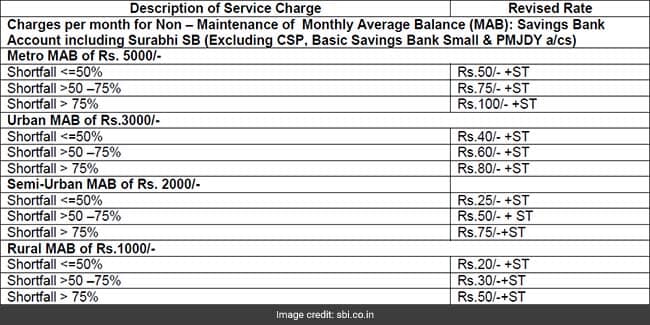
  • SBI currently charges a penalty of up to Rs. 100 (plus GST of 18 per cent) per month for not maintaining monthly average balance (MAB) in savings bank accounts. Customers holding SBI savings bank accounts in metro, urban, semi-urban and rural branches need to pay different penalty amounts for non-maintenance of monthly average balance, according to SBI's website.
  • SBI has specified penalty for various ranges of shortfall for its savings bank customers depending on the categories of branches - rural, semi-urban, urban and metro. For example, if your SBI savings bank account is in one of the metro city branches, you need to maintain a monthly average balance of Rs. 5,000. Also, if the average balance maintained during a month comes out to be between zero and Rs. 1,500, or a shortfall of more than 75 per cent, a non-maintenance charge of Rs. 100 plus GST of 18 per cent will be levied for the month. In case the average balance remains within Rs. 1,500 and Rs. 2,500, which means a shortfall of less than 75 per cent and more than 50 per cent, a charge of Rs. 75 plus taxes will be levied, SBI has said.

SBI charges :
(SBI charges penalty between Rs. 20 to Rs. 100/month for not maintaining minimum balance)

Meanwhile, for savings accounts with average balance of more than Rs. 2,500, SBI will charge a penalty of Rs. 50, plus taxes.


However, for account holders in urban areas other than metros, semi-urban and rural areas, the MAB requirements are Rs. 3,000, Rs. 2,000 and Rs. 1,000 respectively.


image courtesy : sbi bank
thank you...


Sep 17, 2017

Finance Minister Arun Jaitley to launch Google payment app 'Tez' on Monday,18 Sep. 2017

  "FM Shri @arunjaitley to launch the Google Digital Payment app 'TEZ' on Monday, 18th September, 2017 in the national capital," the Finance Ministry confirmed in a tweet on Saturday. 

Tech giant Google will launch its payment app 'TEZ' on Monday as it seeks to cash in on the growing digital payment segment in the country.


The news as first reported on ‘THE KEN’, Indian business blog and the app will likely be launched at a press conference on 18 September in New Delhi by Caesar Sengupta, vice-president, Next Billion Users, Google.

The app is probably going to feature a digital wallet where customers can store money and has been integrated with India’s Unified Payments Interface (UPI) to allow for money transfers at no cost, and an easy checkout system. It’s likewise said to support credit cards and third-party wallets like Paytm and Mobikwik.

It will be available both on the desktop, as a Chrome widget, and as an app on Google’s Play Store or will be pre-installed on the operating system and introduced as part of future updates to the operating system.

Tez is largely fashioned on the Google’s global product—Android Pay, earlier called Google Wallet.

Looking at India’s growing digital commerce and payments space as a huge source of revenue, the effort bodes well for Google enabling the search giant to dive deep into payments.

Right now India’s digital payments ecosystem is intensifying; with a 57% market share, Alibaba-backed Paytm presently dominates in a market swarmed with various mobile wallet players like MobiKwik, FreeCharge, Tencent-backed Hike Messenger, Oxygen, Citrus Pay, ItzCash, Phone Pe, PayU, Jio Money and Ola Money.

Global companies like Truecaller and Uber have also entered the payment space in India while Facebook-owned WhatsApp is working to grab a hold on India’s growing mobile wallet space.


  In July, the National Payments Corporation of India (NPCI) had said Google had completed the testing of its UPI payment service and was awaiting Reserve Bank of India's approval to launch its service in the country.

Google has also sent out invites for the event to "share details on the launch of a new product developed grounds up for India".


 "Tez" (meaning fast in Hindi) may work like Android Pay. 

UPI is a payment system launched by the National Payments Corporation of India (NPCI) and regulated by the Reserve Bank of India which facilitates the instant fund transfer between two bank accounts on the mobile platform. 


"We expect that by December, the number will actually go up to five million PoS, which means that the infrastructure for digital payments is going to grow three times in the short span of one year," MeitY Secretary Aruna Sundararajan said. 


Thank you...


image courtesy : dsim.in, goandroid.co.in, tezappdownload.com